Infusion
灌注 is the gear-upgrade system. The server validates the slots, computes chance and soul cost, rolls the attempt, consumes souls, and writes the result.
Eligible Items
An item is accepted by the gear slot when it is a mining tool or a combat item with managed combat attributes.
Default managed combat attributes:
- Attack Damage
- Attack Speed
- Armor
- Armor Toughness
- Knockback Resistance
Mining tools can also gain Block Speed, a custom Infinite Upgrades stat.
Infusion Screen
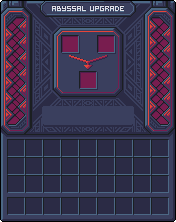
Right-clicking an Angel Statue or Demon Statue opens that side's ritual screen. The left panel is the active ritual, the right panel is the scrollable details view, and the reputation bar sits above the main ritual panel.







Screen details
The details panel can show chance, exact soul cost, possible stat changes, existing totals, and recent history. During an active ritual, the progress fill animates over the main panel and the infuse button stays locked until the server finishes.
Angel vs Demon
Angel upgrades every eligible stat in one successful batch. Demon upgrades one eligible stat per successful batch and chooses between eligible stats with configured weights.
Chance And Soul Cost
Base success chance comes from server config and the item's current upgrade level. Reputation is added as a bonus or penalty, then clamped between 0% and 100%.
Soul cost is based on the item's current level and is computed server-side:
cost = baseCost * (exponentialBase ^ currentLevel) * scaleManual level overrides can replace the formula for specific target levels.
Success And Failure
On success, item level increases by 1, touched stat steps are written to history, totals are recalculated, and the item tooltip receives a visual +N suffix.
On failure, reputation still moves toward the side used, and the latest successful upgrade batch is rolled back when possible.
Upgrade Data
Upgraded items store data under iu_upgrade:
level: current upgrade level.bases: frozen base values.totals: summed percent per stat.history: success and downgrade batches.
Block Speed is stored separately as iu_tool_speed_bonus, where 0.15 means +15%.
支持这个项目
喜欢这个 Wiki 和这些模组吗?
你的每一份支持都能帮助我持续开发新功能、完善文档并发布更新。