Infusion
Infusion is the gear-upgrade system. It is server-authoritative: the server validates the slots, computes the chance and soul cost, rolls the attempt, consumes souls, and writes the result.
Eligible Items
An item is accepted by the gear slot if it is one of these:
- A mining tool: pickaxe, shovel, axe, hoe, or another
DiggerItemfallback. - A combat item with managed combat attributes.
Default managed combat attributes:
- Attack Damage
- Attack Speed
- Armor
- Armor Toughness
- Knockback Resistance
Mining tools can also gain Block Speed, a custom Infinite Upgrades stat.
Infusion Screen
Right-clicking an Angel or Demon statue opens that side's ritual screen. The left panel is the active ritual, the right panel is the scrollable details view, and the reputation bar sits above the main ritual panel.





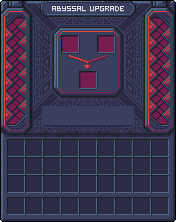


What the screen is showing
The details panel updates from the server-backed menu state. It can show the next attempt's chance, the exact soul cost once known, possible stat changes, existing totals, and recent history. During an active ritual, the progress fill animates over the main panel and the infuse button is locked until the server finishes the attempt.
Angel vs Demon
Angel
Angel upgrades every eligible stat on the item in one successful batch. For example, a sword with Attack Damage and Attack Speed can receive both stat changes at once.
Demon
Demon upgrades one eligible stat per successful batch. When multiple stats are eligible, Demon uses configured weights to choose which stat is touched.
Angel is better when you want steady progress across the whole item. Demon is better when you are willing to gamble on one stat becoming much stronger.
Chance
Base success chance comes from the server config and the item's current upgrade level. The config can use:
- A flat decrement curve.
- An exponential curve.
- Exact per-level overrides.
Reputation is then added on top as a bonus or penalty for the side you are using. The final chance is clamped between 0% and 100%.
Soul Cost
Soul cost is based on the item's current level and is computed server-side. The default model is:
cost = baseCost * (exponentialBase ^ currentLevel) * scaleManual level overrides can replace the formula for specific target levels.
Preview And Details
The output slot can show a preview item before the attempt is finished. Preview stacks are marked internally and cannot be taken as final results.
The details panel can show:
- Final chance.
- Base chance and reputation adjustment.
- Soul cost and available souls.
- Possible upgrades for the current item.
- Current upgrade totals.
- Recent upgrade history.
Success
On success:
- The item level increases by 1, up to the configured max level.
- The touched stat steps are written to upgrade history.
- Totals are recalculated from the frozen base values and stored step sums.
- The item tooltip receives a visual
+Nlevel suffix. - Attribute tooltip lines show the total upgrade percent where possible.
- Mining tools show Block Speed when present.
Failure
On failure:
- Reputation still moves toward the side used, using the failure delta.
- The latest successful upgrade batch is rolled back when possible.
- The output item is returned with the downgraded state.
Failures do not destroy the item, but they can undo the latest level of upgrade progress. This is why reputation, chance, and soul cost matter before pressing the button.
Upgrade Data
Upgraded items store data under iu_upgrade:
level: current upgrade level.bases: frozen base values for managed attributes.totals: current summed percent per stat.history: each success or downgrade batch.
The frozen-base model lets the mod recompute upgraded values consistently instead of repeatedly stacking floating-point edits onto the current item.
Block Speed Details
Block Speed is stored separately as iu_tool_speed_bonus, as a fractional value. For example, 0.15 means +15%.
The block-breaking hook only applies the bonus when:
- The held item is a mining tool.
- The block is being broken with the correct tool.
- The current computed break speed is above zero.
The resulting speed is:
newSpeed = originalSpeed * (1 + blockSpeedBonus)Support This Project
Like this wiki and these mods?
Every bit of support helps me keep building features, writing docs, and shipping updates.