Chronicle Screen
The Chronicle is Timeline's primary UI. By default, press O to open it.
TLDR
- Three tabs: Server, Personal, Hall of Fame.
- Mouse wheel pans timeline,
CTRL + wheelzooms. - Drag the lower bar handle to scrub time quickly.
- Click nodes to open grouped details.
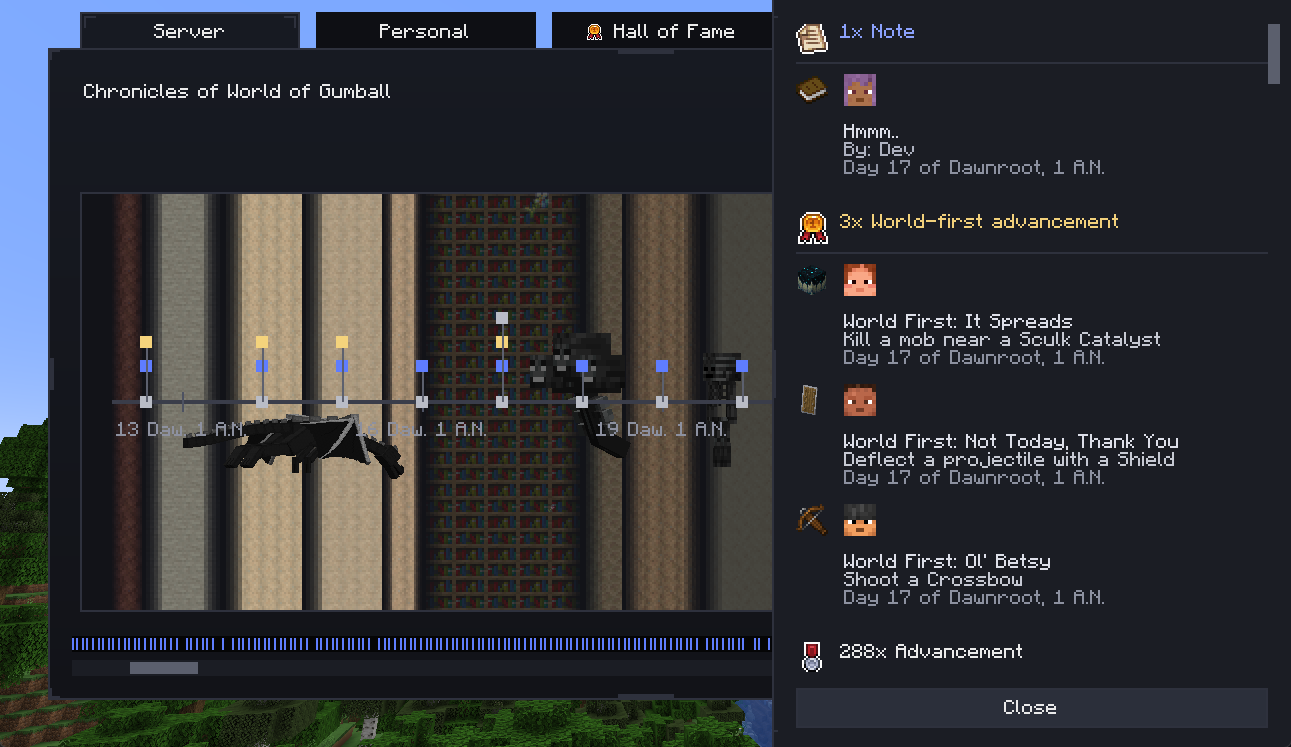
Tabs And Scope
- Server: shared Chronicle view including server-scoped notes and advancement history.
- Personal: only your personal-scoped timeline entries.
- Hall of Fame: player ranking by world-first count and detail drill-down.
Timeline Navigation
You can navigate in multiple ways:
- scroll wheel: pan horizontally through time
CTRL + scroll: zoom in/out between year/month/day granular views- drag scrollbar handle: jump rapidly to distant periods
- jump controls: enter day/month/year directly
The UI auto-selects tick labeling scale from the current zoom span.
Nodes, Grouping, And Detail Panels
Timeline groups nearby events into sections and classifies them as:
- Notes
- World-first advancements
- Other advancements
Clicking a node opens a detail panel with full entries and dates.
DEEP DIVE: grouping model
Internally, grouped nodes are bucketed by visible timeline span. The anchor day is computed from grouped entries, then rendered as one node with drill-down rows.
Timeline Visual Layers
Chronicle can render multiple visual layers behind/over the rail:
- seasonal overlays/particles (spring/summer/autumn/winter)
- default advancement/background textures
- entity overlays from timeframe rules (for major events)
These effects are built from server data and then rendered client-side.
If your timeline appears empty after connecting, reopen the Chronicle once to trigger request/sync, then check the relevant tabs again.
Support This Project
Like this wiki and these mods?
Every bit of support helps me keep building features, writing docs, and shipping updates.