Config
Feathered Friend has two config layers:
- Client config (
featheredfriend-client.toml): UI and local preference behavior. - Server config (
featheredfriend-server.toml): gameplay-authoritative values synced to clients.
In a typical dev run:
neoforge/run/config/featheredfriend-client.tomlneoforge/run/config/featheredfriend-server.toml
Authoritative model
Server config is source of truth for gameplay rules. Clients receive synced values and should treat them as read-only unless server allows editing.
Sync pipeline
- Client requests settings (
RequestServerSettingsPayload). - Server sends full snapshot (
ServerSettingsPayload). - Server also pushes settings on login.
- Server tick watcher checks for config changes and rebroadcasts.
So edits from TOML hot-reload and in-game settings both propagate to connected clients.
Hot-reload behavior
Server config values in FFServerConfig are runtime values.
FFConfigSyncEvents monitors values and rebroadcasts if they change, including:
- feature toggles (
enableSuspiciousFeather,enableSuspiciousChest,enableRavenArmor,enableMailbox) - limits/cooldowns
- chat toggle
ravenLinkDurationSeconds is re-read during active sessions, so current links can shorten/extend immediately after config changes.
DEEP DIVE: dirty-flag + save
Setters in FFServerConfig mark settings dirty and attempt SERVER_SPEC.save() so changes can sync quickly and persist to disk.
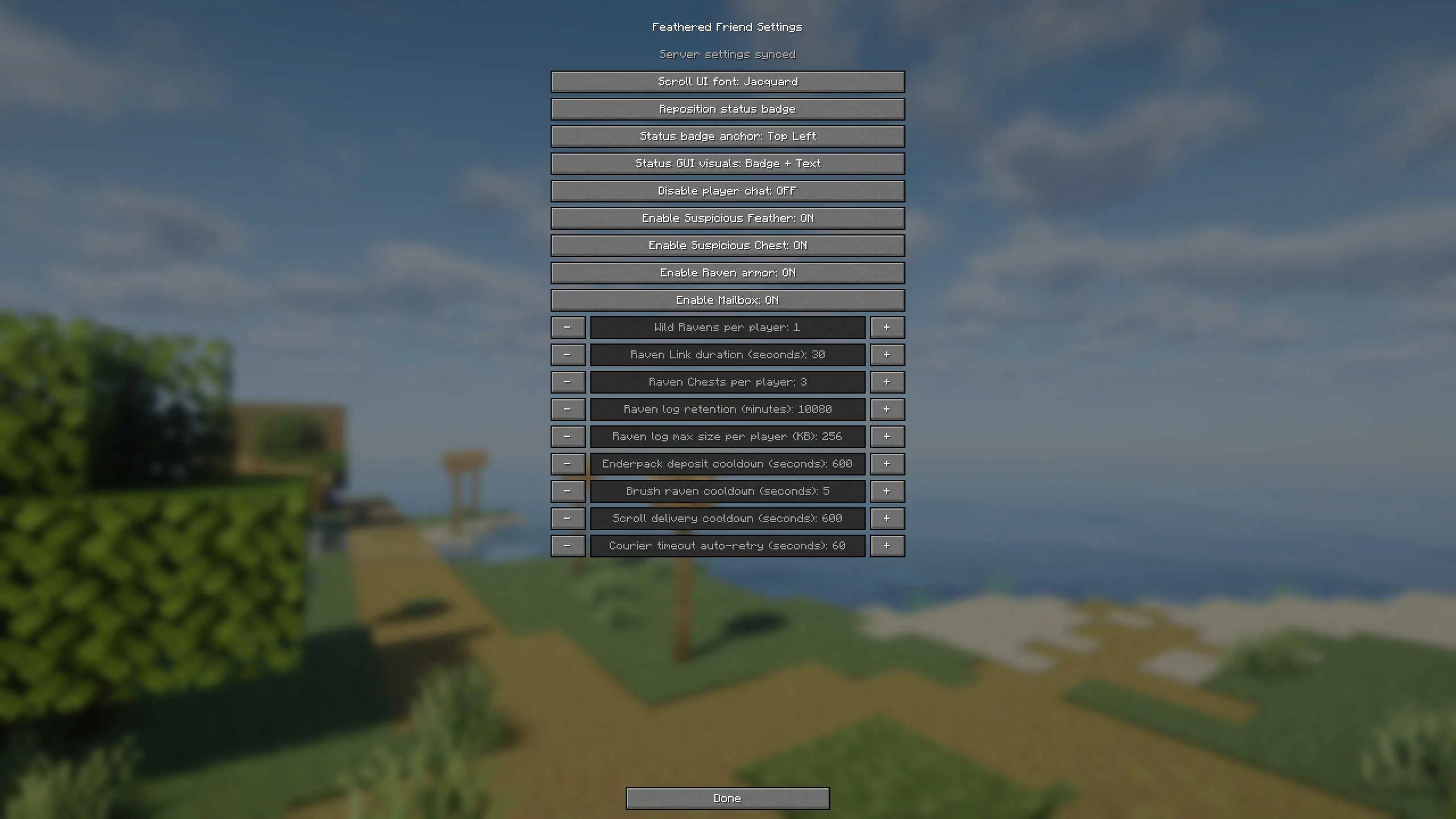
In-game settings permissions
The custom settings GUI opens via the open_settings keybind (unbound by default).
Server-side edits are allowed only when both are true:
allowServerSettingsScreenEditing = true- player has operator permission level 4
Otherwise, clients can view synced values but cannot apply server-setting edits.
Client config (local only)
Client config controls local UI/preferences only, including:
scrollUiFontMode(VANILLA,JACQUARD,ALAGARD)- raven status badge position/anchor/visual mode
- favorite seal stamp key
- raven log view settings (category visibility/colors)
These do not change server gameplay.
Server config (gameplay authority)
settings section
| Key | Default | Range | Purpose |
|---|---|---|---|
chatDisabledDefault | false | bool | Global player chat disable (commands unaffected). |
ravenChestsPerPlayer | 3 | 0..64 | Max placed Suspicious Chests per player. |
ravenLogRetentionMinutes | 10080 | 0..129600 | Raven log retention window (minutes). |
ravenLogMaxBytesPerPlayer | 262144 | 0..4194304 | Max Raven log size per player before clear. |
enderpackDepositCooldownSeconds | 600 | 0..86400 | Cooldown between Enderpack -> chest deposit workflows. |
scrollDeliveryCooldownSeconds | 600 | 0..86400 | Cooldown between scroll courier dispatches. |
courierTimeoutRetrySeconds | 60 | 0..86400 | Auto-retry interval for timeout-failed courier jobs. |
brushRavenCooldownSeconds | 30 | 0..86400 | Cooldown between brushing ravens. |
ravenLinkDurationSeconds | 30 | 5..600 | Raven Link session duration. |
allowServerSettingsScreenEditing | true | bool | Allows/disallows OP editing in settings screen. |
features.enableSuspiciousFeather | true | bool | Enables Suspicious Feather logic. |
features.enableSuspiciousChest | true | bool | Enables Suspicious Chest special logic. |
features.enableRavenArmor | true | bool | Enables Raven Armor equip/stat logic. |
features.enableMailbox | true | bool | Enables mailbox spotting + courier mailbox routing. |
spawning section
| Key | Default | Range | Purpose |
|---|---|---|---|
wildRavensPerPlayer | 1 | 0..16 | Wild raven cap per online non-spectator player. |
If a feature toggle is off
Feature toggles disable logic, not item/block existence:
- existing items/blocks remain
- inventories remain accessible
- feature-specific runtime systems are skipped
Examples:
enableMailbox=false: mailbox storage still opens, but spotting/routing is disabled.enableSuspiciousChest=false: chest storage still works, but perch/deposit logic is disabled.enableSuspiciousFeather=false: Raven Link start/revive path is disabled.
Disabling a feature is a behavior toggle only. It does not remove existing world data for that feature.
Server Snapshot Example
{
  "settings": {
    "ravenChestsPerPlayer": 3,
    "enderpackDepositCooldownSeconds": 600,
    "scrollDeliveryCooldownSeconds": 600,
    "ravenLinkDurationSeconds": 30,
    "allowServerSettingsScreenEditing": true,
    "features": {
      "enableSuspiciousFeather": true,
      "enableSuspiciousChest": true,
      "enableRavenArmor": true,
      "enableMailbox": true
    }
  },
  "spawning": {
    "wildRavensPerPlayer": 1
  }
}
Support This Project
Like this wiki and these mods?
Every bit of support helps me keep building features, writing docs, and shipping updates.