Entity Studies
Sketchbook 可以把望远镜变成野外研究工具。先研究一个活体实体,然后把它作为实体素描放到空白书页上。
快速流程
- 手持望远镜并按住右键,直接看向一个活体实体。
- 第一次研究会识别该实体,并为你的玩家保存它的视觉变体。
- 继续研究同一个已识别实体,可以完成更长的详细研究。
- 打开书与笔,右键点击空白页面,选择
Entities,然后放置已研究实体的素描。
用望远镜研究
实体研究只会在没有其他界面打开、并且玩家正在主动使用望远镜时运行。
| 规则 | 行为 |
|---|---|
| 目标类型 | 目标必须是活体实体。玩家会被忽略。 |
| 距离 | 目标最远可以在 96 格以内。 |
| 可见性 | 目标必须存活、可见、可被选中,并且在视线范围内。 |
| 瞄准 | 你的视线射线必须击中目标扩大的碰撞箱;只是看向附近还不够。 |
| 反馈 | 研究时目标会发光,粒子会环绕目标,准星附近会显示进度条。 |
第一次研究大约需要 3 秒。如果该实体已经被识别但还缺少详细信息,Sketchbook 会改为开始详细研究。
两个研究层级
| 层级 | 时间 | 解锁内容 |
|---|---|---|
| 识别 | 60 tick | 实体类型、显示名称和视觉变体,可用于实体素描。 |
| 详细研究 | 300 tick | 页面上的可选信息:生命值、护甲、移动速度、护甲韧性和攻击伤害。 |
详细研究只会在同一个实体变体已经被识别后开始。研究完成时,服务器会再次检查望远镜使用、距离、视线和瞄准;如果离开、失去视线或没有对准,结果会被取消。
变体数据
Sketchbook 只保存稳定的视觉数据,例如猫/狼变体、热带鱼变体、花纹和颜色值。位置、生命值、装备、AI 状态、乘客、UUID 以及其他易变实体数据都会被移除。
书中的实体素描
目标被识别后,会出现在书页右键菜单的 Entities 下。
- 打开书与笔,或兼容的 Scholar 书/讲台。
- 右键点击空白页面。
- 选择
Entities。 - 选择一个已研究的实体。
- 开关你想显示在页面上的已解锁详细信息。
实体素描遵循与普通素描相同的页面规则:新的实体素描需要空白页面,并且需要可用的铅笔或铅笔盒。更新已有实体素描上的可见详细信息时也需要铅笔。普通截图素描和实体素描不能占用同一页。
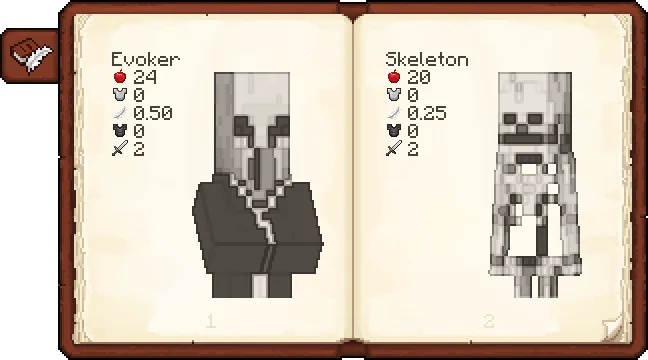
详细信息行
详细研究可以为实体页面解锁这些可选备注:
| 信息 | 来源 |
|---|---|
| 名称 | 在第一次识别时保存。 |
| 生命值 | 实体的最大生命值。 |
| 护甲 | 实体当前的护甲值。 |
| 移动速度 | 移动速度属性,如果存在。 |
| 护甲韧性 | 护甲韧性属性,如果存在。 |
| 伤害 | 攻击伤害属性,如果存在。 |
数值会被干净地四舍五入。整数不显示小数;小数值显示两位小数。
进度
Sketchbook 添加了一个生物研究进度页。
| 进度 | 如何获得 |
|---|---|
| Sketchbook | 完成任意受支持原版生物的详细研究。 |
Detailed Study: <Creature> | 完成该特定原版生物的详细研究。 |
| Grand Bestiary | 完成所有受支持的原版详细研究进度。 |
只有详细研究会授予这些进度。第一次识别已经足以放置实体素描,但不会完成详细研究进度。
进度树会为受支持的原版 Minecraft 生物生成。模组添加的活体实体仍然可以被识别、研究和素描,但除非对应模组单独添加,否则不会获得每个实体的进度条目。
故障排查
| 现象 | 可能原因 |
|---|---|
| 没有出现进度条 | 你没有主动使用望远镜,目标不是活体、不可见,或有其他界面打开。 |
| 研究被取消 | 目标离开距离、脱离视线、死亡,或你的准星离开了碰撞箱。 |
| 实体没有出现在书本菜单中 | 你的玩家还没有识别过这个实体类型和视觉变体。 |
| 无法切换详细信息 | 详细研究尚未完成,或更新页面时你没有可用铅笔。 |
Visual Reference
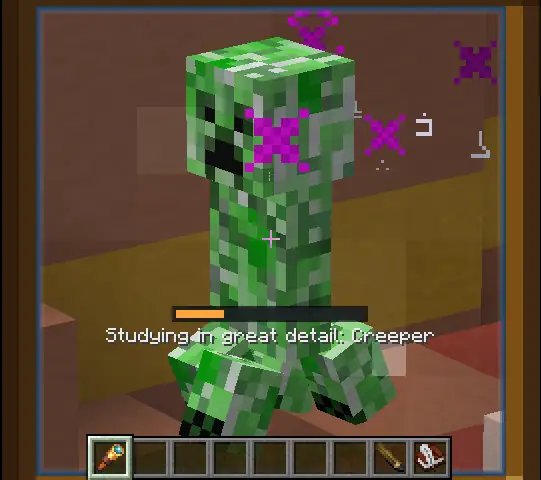
This screenshot shows the second study tier: the detailed pass. The orange bar is the 300-tick detailed-study progress bar. The shorter identify pass uses a cyan bar. During both passes, Sketchbook makes the target glow and spawns enchant-style particles around it; the detailed pass adds witch-style particles so it is visually distinct.
60 ticks. Cyan bar. Enchant particles mark the target while its type and visual variant are learned.
300 ticks. Orange bar. Witch particles join the enchant particles while combat and movement details are learned.
The book preview shows what detailed study unlocks on the page: the studied entity name plus optional values such as health, armor, armor toughness, damage, and movement speed.
Spyglass Recipe
The study system uses Minecraft's vanilla Spyglass. The recipe is included here because it is the entry item for this feature.


Position, Rotation, And Scale Controls
After placing an entity sketch in a writable book, you can adjust how the entity sits on the page.
| Control | Result |
|---|---|
| Left mouse drag | Moves the entity sketch across the page. |
| Mouse wheel | Scales the entity sketch up or down. The saved scale is clamped between 8 and 160. |
| Middle mouse drag | Rotates the entity sketch. Horizontal drag changes the rotation angle. |
These transform controls apply while editing a writable book and while the cursor is over the entity sketch/page area. The client previews the change immediately, then sends the updated transform to the server after a short idle delay.
支持这个项目
喜欢这个 Wiki 和这些模组吗?
你的每一份支持都能帮助我持续开发新功能、完善文档并发布更新。