Entity Studies
Sketchbook can turn a Spyglass into a field-study tool. Study a living entity first, then place that entity as a sketched subject on an empty book page.
Quick flow
- Hold right click with a Spyglass while looking directly at a living entity.
- The first study identifies the entity and stores its visual variant for your player.
- Keep studying the same identified entity for the longer detailed pass.
- Open a writable book, right click an empty page, choose
Entities, then place a studied entity sketch.
Studying With A Spyglass
Entity study only runs while the client has no other screen open and the player is actively using a Spyglass.
| Rule | Behavior |
|---|---|
| Target type | The target must be a living entity. Players are ignored. |
| Range | The target can be up to 96 blocks away. |
| Visibility | The target must be alive, visible, pickable, and in line of sight. |
| Aim | Your look ray must hit the target's inflated hitbox, so glancing near the entity is not enough. |
| Feedback | The target glows while being studied, particles orbit it, and a progress bar appears near the crosshair. |
The first pass takes about 3 seconds. If the entity is already identified but still missing details, Sketchbook starts the detailed pass instead.
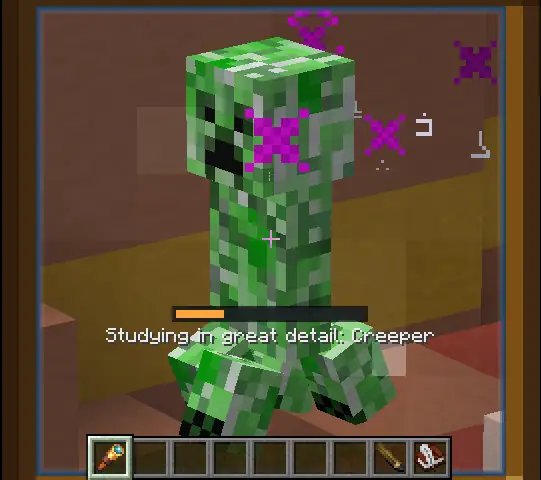
The screenshot above shows the second tier: Studying in great detail. The orange bar is the detailed-study progress bar, which takes 300 ticks instead of the shorter 60-tick identify pass. During the scan, Sketchbook makes the target glow and spawns orbiting particles around it. The regular identify pass uses enchant-style particles and a cyan bar; the detailed pass keeps those particles and adds witch-style particles with an orange bar so the longer scan is easy to tell apart.
Scan HUD Reference
60 ticks. Cyan bar. Enchant particles mark the target while its type and visual variant are learned.
300 ticks. Orange bar. Witch particles join the enchant particles while combat and movement details are learned.
Two Study Tiers
| Tier | Time | Unlocks |
|---|---|---|
| Identify | 60 ticks | The entity type, display name, and visual variant can be used for entity sketches. |
| Detailed study | 300 ticks | Optional page details for health, armor, movement speed, armor toughness, and attack damage. |
Detailed study only starts after the same entity variant has already been identified. The server checks Spyglass use, range, line of sight, and aim again when the study completes, so moving away or losing sight cancels the result.
Variant data
Sketchbook stores only stable visual data such as cat/wolf variants, tropical fish variants, markings, and colour values. Position, health, equipment, AI state, passengers, UUIDs, and other volatile entity data are stripped out.
Entity Sketches In Books
After a target has been identified, it appears in the book page context menu under Entities.
- Open a Book and Quill, or a compatible Scholar book/lectern.
- Right click an empty page.
- Choose
Entities. - Select one of the studied entities.
- Toggle any unlocked detail lines you want shown on the page.
Entity sketches follow the same page rules as normal sketches: a new entity sketch needs an empty page and a usable Pencil or Pencil Case. Updating the visible detail lines on an existing entity sketch also requires a pencil. A normal screenshot sketch and an entity sketch cannot occupy the same page.
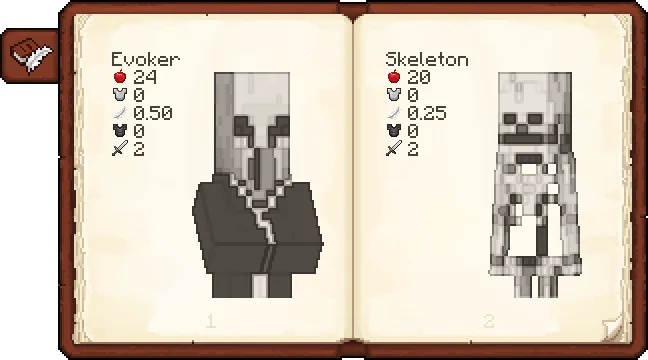
The book view demonstrates why detailed study matters: once details are unlocked, an entity sketch page can show the studied entity name plus values such as health, armor, armor toughness, damage, and movement speed. The menu lets the player decide which unlocked lines belong on the page.
Position, Rotation, And Scale Controls
After placing an entity sketch in a writable book, you can adjust how the entity sits on the page.
| Control | Result |
|---|---|
| Left mouse drag | Moves the entity sketch across the page. |
| Mouse wheel | Scales the entity sketch up or down. The saved scale is clamped between 8 and 160. |
| Middle mouse drag | Rotates the entity sketch. Horizontal drag changes the rotation angle. |
These transform controls apply while editing a writable book and while the cursor is over the entity sketch/page area. The client previews the change immediately, then sends the updated transform to the server after a short idle delay.
Detail Lines
Detailed study can unlock these optional notes for an entity page:
| Detail | Source |
|---|---|
| Name | Stored during the first identification pass. |
| Health | The entity's maximum health. |
| Armor | The entity's current armor value. |
| Movement Speed | The movement speed attribute, if present. |
| Armor Toughness | The armor toughness attribute, if present. |
| Damage | The attack damage attribute, if present. |
Numbers are rounded cleanly. Whole numbers display without decimals; fractional values display with two decimals.
Spyglass Recipe
The study system uses Minecraft's vanilla Spyglass. The recipe is included here because it is the entry item for this feature.


Advancements
Sketchbook adds a creature-study advancement tab.
| Advancement | How to earn it |
|---|---|
| Sketchbook | Complete a detailed study for any supported vanilla creature. |
Detailed Study: <Creature> | Complete a detailed study for that specific vanilla creature. |
| Grand Bestiary | Complete every supported vanilla detailed-study advancement. |
Only detailed studies award these advancements. The first identify pass is enough to place an entity sketch, but it does not complete the detailed-study advancement.
The advancement tree is generated for supported vanilla Minecraft creatures. Modded living entities can still be identified, studied, and sketched, but they do not receive per-entity advancement entries unless the mod adds them separately.
Troubleshooting
| Symptom | Likely cause |
|---|---|
| No progress bar appears | You are not actively using a Spyglass, the target is not living, the target is invisible, or another screen is open. |
| The study cancels | The target moved out of range, left line of sight, died, or your aim moved off the hitbox. |
| The entity is not in the book menu | That specific entity type and visual variant has not been identified by your player yet. |
| Details cannot be toggled | The detailed pass has not been completed yet, or you do not have a usable Pencil when updating the page. |
Support This Project
Like this wiki and these mods?
Every bit of support helps me keep building features, writing docs, and shipping updates.